
A
Browse and edit
- A discipline → category → family → type tree on the left
- A type-parameter grid you edit directly on the right
- Batch rename by pattern with duplicate-name preview
- Quick filter by name or by empty parameter
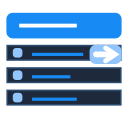
Manage type names and type parameters for every family through a four-level tree — discipline, category, family, type — editing in bulk in the grid on the right.
Family types are scattered across categories in the Project Browser, and type parameters only open one at a time behind a Type Properties double-click — a project with a few hundred types means a few hundred rounds of open, edit, close, and a duplicate name only shows up once Revit blocks it mid-operation.
The Project Browser shows the family/type tree, but renaming or editing a type parameter still means double-clicking Type Properties, editing, OK, then repeating for the next type.
Hand-rename your way to type 40 and hit a duplicate, and Revit blocks it on the spot — there's no pre-check list of collisions, so you have to remember exactly where you left off.
There's no cross-category filter for empty parameters — finding types missing Fire Rating or Cost means building a separate schedule per category and scanning it by eye.
The Project Browser only organises by Revit's own categories, not by discipline the way a BEP expects — checking how many Structure types are missing data means manually grouping several categories together yourself.
Magic Rename Tool ($4/month) batch-renames families, types, views and sheets with prefixes, suffixes, find-and-replace and case changes, but its trial caps out at 5 items per session and it only does one job — renaming. No discipline-level drill-down tree, no editing type parameters alongside the rename. Type Name Manager combines browsing and editing in one window:
The interface is matched to the tool window running in Revit.
 Family Manager
See every family and type in the project: what is used, what is not, renamed and reloaded in batches.
 Parameter Manager
Create, bind and remove shared parameters by category; find missing parameters before quantity take-off.
 Fill Parameter
Fill parameters in bulk by formula, by location or by room — instead of typing element by element.