
A
Copy properties
- Copies both the type and every instance parameter
- No window — it runs right in the view
- Apply to several targets in a row
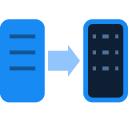
Copy the type and every instance parameter from a source element to a target in a single action, with no window at all.
Revit's built-in Match Type Properties command only swaps the target's type; every instance parameter — comments, mark, fire rating, sill-height overrides — still has to be read from Properties and retyped by hand, one target element at a time.
The Match Type Properties (MA) command only changes the type; comments, mark, fire rating or shared instance parameters still have to be read from Properties and retyped onto the target by hand.
Copying 6–8 parameters by hand for one element takes half a minute; matching 40–50 similar elements — doors, MEP fixtures — to a template burns half a day just retyping data that already exists on the source element.
Reading a value off the source element's Properties panel and typing it onto the target has no way to line the two up side by side — a mistyped fire rating or mark only surfaces at QA.
Match Type Properties requires toggling the right group in its Settings dialog — walls, floors, rooms — before it runs; switch to a different element group and you have to reopen Settings and configure it again.
The closest free option, Copy Parameter on the Autodesk App Store, copies one parameter into another for elements of the same category — but every source-target pair has to be configured in a dialog first, and it has no notion of 'pick a source element, apply it to a target' the way Revit's own Match Type Properties does, and that native command only swaps the type, never the instance parameters. Quick Match targets exactly that gap:
The interface is matched to the tool window running in Revit.
 Project Cleaner
Purge dead views, empty groups, unused families and leftover CAD imports — shrink the file before you issue.
 Style Forge
Audit usage and duplicates; safely create, edit, duplicate, merge and delete Object, Line, Text, Dimension, Viewport and Scope Box styles. The AI assistant and account-saved presets only queue changes — you press Apply yourself.
 Batch Exporter
Export PDF, DWG, IFC and NWC from a saved sheet set, named to the project rule with a per-issue log.